
[ Permits to Work ]
A permit for the task happening right now, not a duplicate SWMS
A SWMS documents the general method for a type of task -- reusable across jobs. It doesn't record that a specific instance of that task, on a specific day, was actually checked and authorised to start, and checked again once the area was made safe. Novato's Permits to Work is that live record: draft, issued, closed, optionally linked to the SWMS it's authorising an occurrence of.
How it works
Create a permit for the task
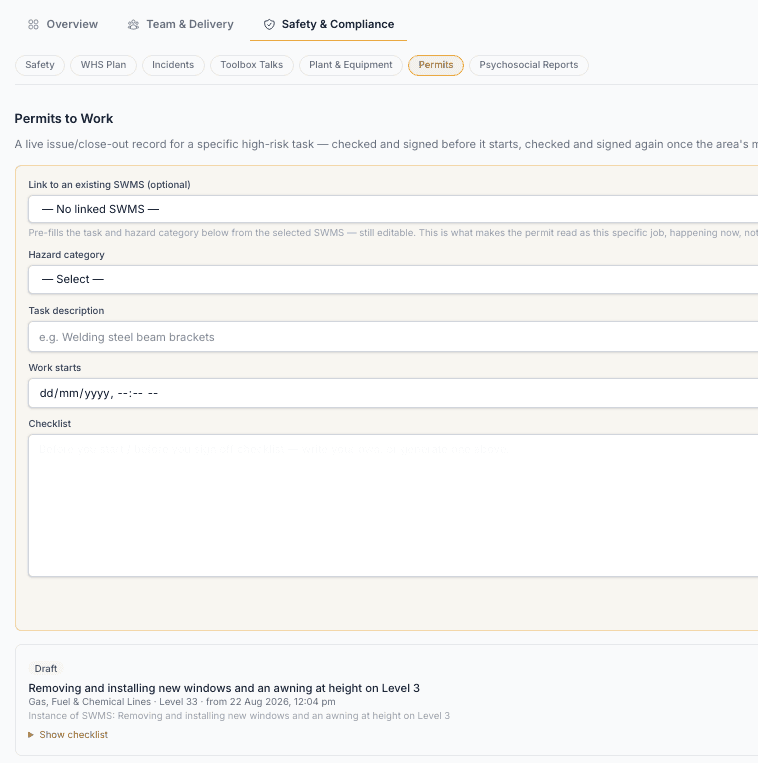
Pick a hazard category, describe the task and location, and set a work window -- optionally link it to an approved SWMS already on the project, which pre-fills the task and hazard category from it.
Draft a checklist
Write it yourself, or have one drafted from the task and hazard category -- before-you-start and before-you-sign-off sections, reviewed and edited before saving.
Issue it before work starts
A Site Supervisor or Admin confirms the area's checked and safe to start, with a typed confirmation and an optional drawn signature.
Close it out once the area's safe again
Same sign-off shape, at the other end of the job -- confirms isolations are restored and the area's been made safe, not just that the task is finished.
How this fits Australian WHS compliance
The permit's issued_by/issued_at and closed_by/closed_at are stamped at the moment each decision was made, not backfilled -- a real record of who authorised a specific high-risk task to start, and who confirmed the area was safe again, distinct from the general method statement (SWMS) it may be linked to.
Common questions
How is this different from a SWMS?
A SWMS documents the general method for a task -- reusable across jobs. A permit is a live record of one specific instance: issued before it starts, closed out once the area's made safe. You can link a permit to an approved SWMS so it reads as an instance of that method statement, not a second description of the same work.
Can a subcontractor issue or close out their own permit?
No -- both are a Principal Contractor-side decision (Site Supervisor or Admin), not something done through a subcontractor-facing link.
Can I link a permit to a SWMS that's still in draft?
No -- only an approved SWMS can be linked. Linking to a draft would authorise work under a method statement nobody's actually signed off on yet.
Which plan includes Permits to Work?
Every plan, including the free trial -- it's not currently restricted by plan tier.