
[ Payment Requests ]
Progress claims, submitted and decided in one place
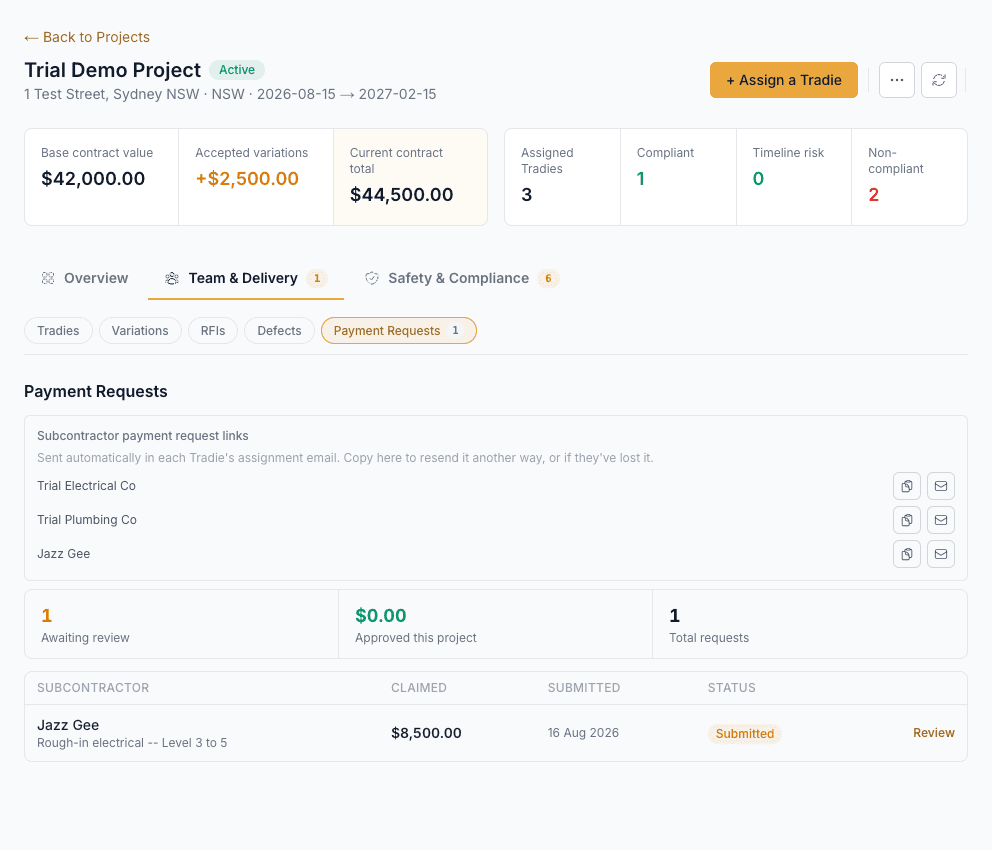
A subcontractor's progress claim usually arrives as an email, a PDF, or a text message, with no record of when it was sent, what it actually covered, or when it was decided -- and no easy way to check it against what's actually been done on site. Novato gives every subcontractor a standing link to submit a claim against, and gives you an approve/reject decision that automatically produces a tax invoice.
How it works
Every subcontractor gets a standing payment request link
Sent automatically once they're assigned to a project -- the same link every time, bookmarked, not re-issued per claim.
They describe the work and let AI itemise it, or do it by hand
A plain description of what was done gets split into line items automatically -- quantities where stated, no invented dollar figures, and never a total until the subcontractor prices it themselves.
It lands in your Payment Requests queue
Claimed amount, period, and every line item, against the right project and the right subcontractor -- ready to review, not buried in an inbox.
Approve or reject -- a tax invoice is generated on approval
Approving a claim automatically produces the tax invoice and emails it to the subcontractor; rejecting sends a reason back so they can correct and resubmit the same claim.
How this fits Australian WHS compliance
Under Australian security-of-payment law, a subcontractor's right to be paid for work already completed doesn't lapse just because a project is paused, cancelled, or archived afterward -- Novato's payment request routes are deliberately not blocked by project status, unlike almost every other action in the app. A rejected claim always carries a reason back to the subcontractor, and every decision keeps a timestamped record either way.
Common questions
Does Novato process the actual payment?
No -- Novato records and manages the claim and its approval, and generates the tax invoice once approved. The payment itself still happens through whatever method you already use with that subcontractor.
Can a subcontractor edit a claim after submitting it?
Yes, while it's still awaiting a decision or after a rejection -- editing a rejected claim resubmits it fresh rather than leaving a corrected version stuck in limbo. An approved claim can't be edited, since its tax invoice has already been issued.
What happens if I pause or cancel a project with an open claim?
Nothing changes for the claim -- a subcontractor can still submit or resubmit a payment request regardless of the project's status, and you can still approve or reject it. That's a deliberate choice, not an oversight -- see the compliance note above.
Does the AI itemisation invent an amount?
No -- it only ever splits a description into line items and quantities the text actually states. Pricing is always entered by the subcontractor themselves, never guessed.
Which plan includes Payment Requests?
Armor -- see Pricing for the full comparison.