
[ Xero Integration ]
An approved claim, already in Xero
Approving a subcontractor's payment request in Novato used to be the end of the trail -- someone still had to open Xero and enter the same claim again as a bill, by hand, from the same numbers Novato already had. Connect Xero once, and every claim you approve from then on shows up there on its own, coded to the account you've chosen.
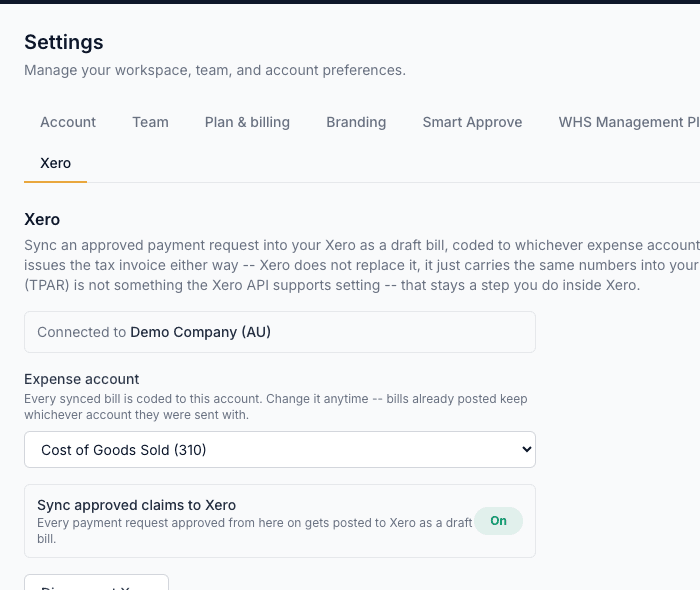
How it works
Connect your Xero organisation once
From Settings, sign in to Xero and authorise Novato -- a standard Xero login, not a shared password or API key you have to manage yourself.
Pick the expense account claims should post to
Chosen from your own Xero chart of accounts, so every synced bill lands where your bookkeeper expects it -- not a guess Novato makes on your behalf.
Turn on sync when you're ready
Nothing posts to Xero until you explicitly flip "Sync approved claims to Xero" on -- connecting and picking an account are both prerequisites, neither one is consent to start posting bills.
Approve a payment request as normal
The moment it's approved, Novato pushes it to Xero as a draft bill with the claimed amount and line items -- Novato still issues the tax invoice either way; Xero doesn't replace that, it just carries the same numbers into your books.
How this fits Australian WHS compliance
This is a bookkeeping convenience, not a compliance feature -- Novato still generates the tax invoice on approval regardless of whether Xero is connected, and TPAR reporting to the ATO isn't something the Xero API supports setting, so that stays a step you do inside Xero yourself. Connecting Xero changes nothing about how a payment request is reviewed, approved, or recorded in Novato.
Common questions
Does this replace the tax invoice Novato generates?
No -- Novato issues the tax invoice on approval either way. Xero sync just carries the same claim into your books as a draft bill, so you're not entering it twice.
Does a bill post automatically the moment I approve a claim?
Only once you've both connected Xero and turned the sync toggle on. Until then, connecting Xero and picking an account changes nothing about how approvals work.
Can I change the expense account later?
Yes, any time from Settings. Bills already posted keep whichever account they were sent with -- changing it only affects claims approved after the change.
Does this handle TPAR reporting to the ATO?
No -- that's not something the Xero API supports setting from an integration like this, so TPAR stays a step you do inside Xero yourself.
What happens if I disconnect Xero?
Sync stops immediately. Nothing about your payment requests or their tax invoices in Novato changes -- only the automatic push to Xero stops.
Which plan includes the Xero integration?
Armor -- the same plan Payment Requests itself is on, since there's nothing to sync without it. See Pricing for the full comparison.